¶ License Activate
In order to be able to use DS Sign&Go, you must first have a valid license to import to the app. If you wish to apply for a free trial, this tutorial also guids you through this process.
¶ DS Sign&Go License
- First, you'll need to allow the middleware activate it's extension on chrome. The following prompt will be shown to you:
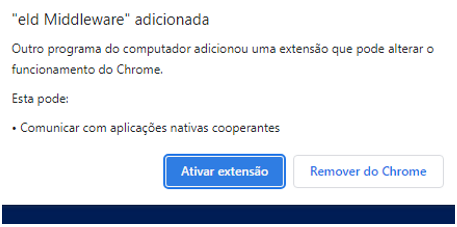
- Click on Ativar extensão. The following screen will be shown:
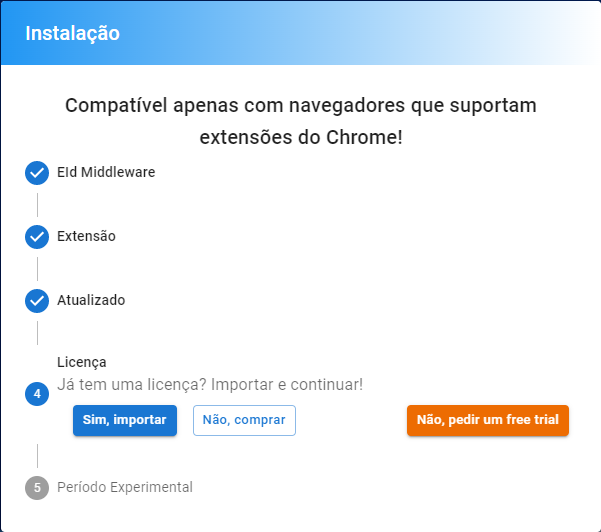
- You must choose the correct option. Either Sim, importar if you already have a valid license, or Não, comprar if you have to purchase a valid license. There's also the possibility to apply for a free trial Não, pedir um free trial.
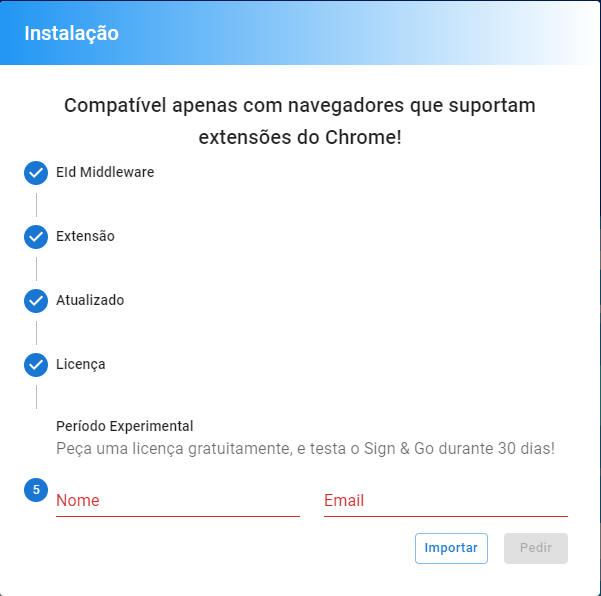
- If you've chosen the free trial otption, you'll be asked to insert your name and email adress so that DigitalSign can send you your free trial license:
- After those steps, you'll have to insert the code that you have received via email to activate your license:
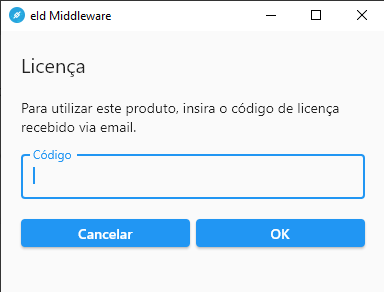
- After inserting the code, click on OK to activate your license.